Lighthearted AI in Home Assistant
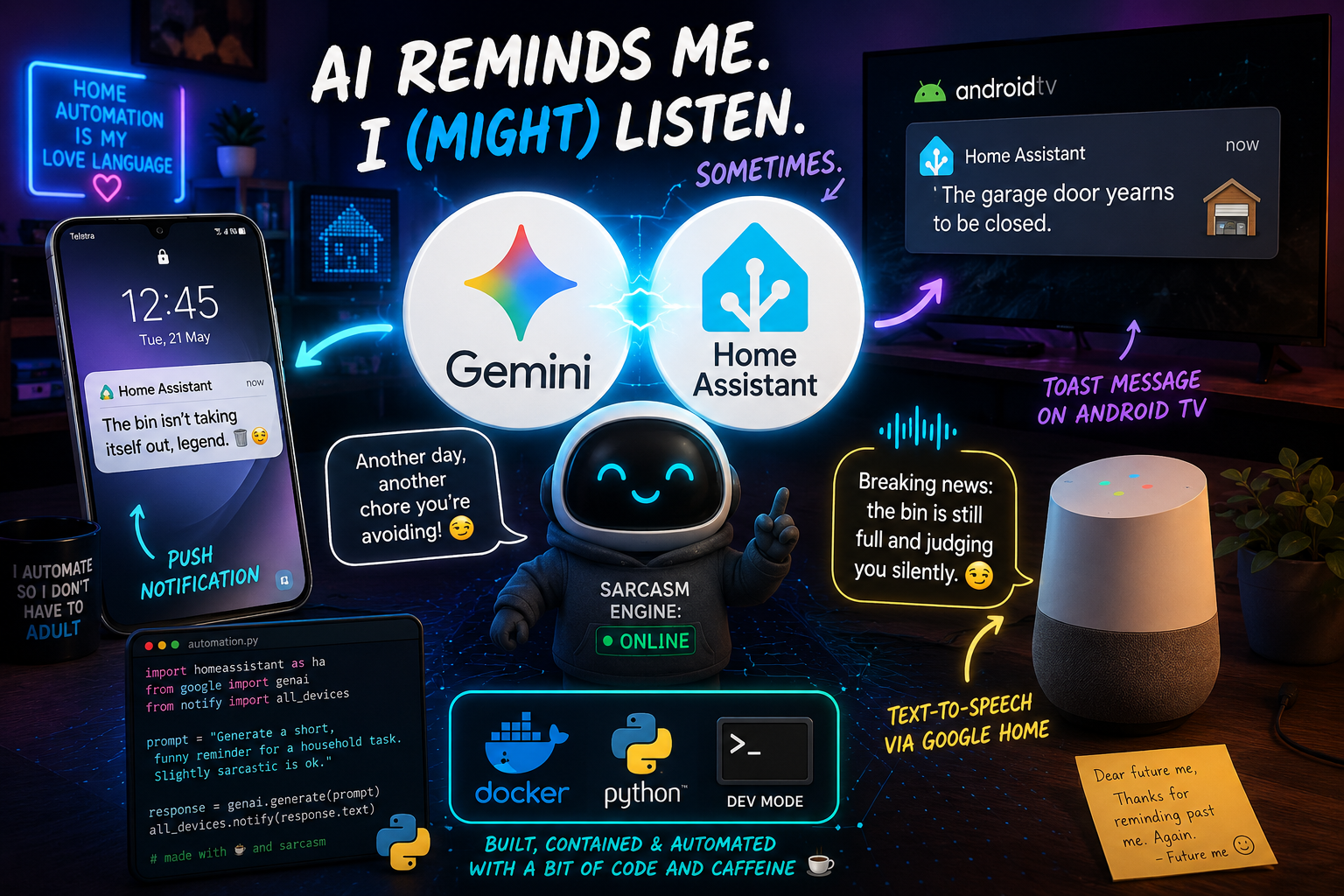
There is something surprisingly satisfying about your smart home roasting you for forgetting to take the bins out.
Over the last while, I have been experimenting with adding AI into my Home Assistant setup, not for complicated automations or predictive logic, but simply to make notifications feel more human, entertaining and far less repetitive.
Instead of receiving the same robotic reminder every week, I now have Google Gemini dynamically generating messages that get pushed to my phone, displayed as toast notifications on the Android TV, and even announced over Google Home speakers using text-to-speech.
And honestly… it has made boring household reminders far more enjoyable.
The Problem with Traditional Notifications
Most Home Assistant notifications eventually become background noise.
You see the same message over and over:
“Reminder: Take the bins out.”
After enough repetitions, your brain completely ignores it.
I wanted something that would:
- Feel less repetitive
- Be a little funny
- Sometimes sarcastic
- Keep the household entertained
- Still actually remind me to do things
That is where AI became surprisingly useful.
The Idea
Instead of hardcoding notification text into automations, I decided to let AI generate the message dynamically every time the automation runs.
For example:
- Bin reminders
- Locking doors
- Closing the garage
- Feeding pets or buying their food
- Switching things off
- General household chores
Each notification becomes unique.
Sometimes Gemini generates polite reminders.
Sometimes it generates passive aggressive comments.
Sometimes it becomes unexpectedly dramatic.
That unpredictability makes the notifications impossible to ignore.
My Setup
Here is the stack I am currently using:
- Home Assistant
- Google Gemini
- Google Home
- Android TV
The overall flow looks like this:
- Home Assistant automation triggers
- A prompt is sent to Gemini
- Gemini generates a short message
- Home Assistant distributes the message to:
- Mobile push notifications
- Android TV toast notifications
- Google Home TTS announcements
The result feels far more alive than static automations.
Example Prompts
The magic is mostly in the prompt engineering.
Here is a simple example I use for a bin reminder:
Generate a short funny push notification reminder to take the
bin out. Keep it under 20 words.
You may be slightly sarcastic but not rude.
Only provide one response, and do not include surrounding punctuation.
Simple prompt changes can dramatically alter the personality.
You can make it:
- Friendly
- Chaotic
- Formal
- Passive aggressive
- Nerdy
- Dramatic
One of the funniest things about this setup is that you genuinely do not know what message you are going to get next.
Some Real Examples
A few examples Gemini has generated for me:
“The bin isn’t taking itself out, unfortunately technology hasn’t solved that yet.”
“Reminder: the garage door is still open, unless we’re inviting raccoons now.”
“Your future self would really appreciate it if you handled the bins tonight.”
“Breaking news: the bin is still full and judging you silently.”
“The house has noticed your procrastination regarding the garage door.”
Some are surprisingly clever.
Others are completely ridiculous.
That unpredictability is exactly what keeps the notifications effective.
Home Assistant Script Example
Here is a simplified version of the Home Assistant automation and you will notice I call a script in this. All my notification automations can delegate the AI task to a script that just accepts the AI prompt and default message (incase of failure) and returns the text back to the automation. Not all notification use all media some are only phone, some are TOAST and Google speakers, this is why the script does not deal with that part but only the AI generation. The automation decides where to publish the notifcation too.
alias: Reminder - Take the bin out for collection
description: ""
triggers:
  - trigger: time
    at: "17:00:00"
    weekday:
      - sun
conditions: []
actions:
  - action: script.dynamic_ai_generated_notifications
    metadata: {}
    data:
      ai_prompt: >-
        Generate a short funny push notificaiton text to remind Collin to take
        the bin out. just provide one option, max 7 words, with no punctuation
        surrounding the text
      default_message: Collin, Take the bin out
    response_variable: message
    enabled: true
  - action: notify.mobile_app_collin_a34
    data:
      title: Bin
      data:
        notification_icon: mdi:delete
      message: "{{ message.text }}"
    enabled: true
  - parallel:
      - action: script.google_speaker_announce
        metadata: {}
        data:
          message: "{{ message.text | string }}"
          volume: 0.5
      - alias: Show Message on LG TV
        action: notify.lg_webos_smart_tv
        metadata: {}
        data:
          message: "{{ message.text }}"
        enabled: true
      - delay:
          hours: 0
          minutes: 0
          seconds: 4
          milliseconds: 0
      - alias: Show Message on LG TV
        action: notify.lg_webos_smart_tv
        metadata: {}
        data:
          message: "{{ message.text }}"
        enabled: true
    enabled: true
mode: single
The important part is that the AI-generated text gets reused across multiple notification channels.
That consistency makes the whole house feel connected. In the case of errors from the AI or free tokens allocation used up, I have provided a default message for each use case, to return that instead of nothing or breaking the automation mid way.
Android TV Toast Notifications
One of my favourite parts of this setup is sending toast notifications directly to the TV.
If I am watching TV or sitting in the lounge, a message suddenly appears saying something like:
“The garage door yearns to be closed.”
It is subtle enough not to interrupt what you are watching, but visible enough that you cannot really ignore it.
It feels much more natural than a loud alarm or repetitive notification sound.
Google Home Text-to-Speech
This is where things become genuinely entertaining.
Hearing a multipble Google Home speakers announce AI-generated sarcasm in a calm robotic voice somehow makes it even funnier.
Especially when:
- Guests are visiting
- The AI gets unexpectedly dramatic
- The message sounds oddly judgmental
The contrast between the calm voice and the ridiculous message is perfect.
Why This Works So Well
The biggest reason this system works is novelty.
Your brain quickly filters out repetitive automation messages.
AI-generated notifications stay fresh because:
- The wording changes constantly
- The tone varies
- The humour feels unexpected
- You become curious about what it will say next
Ironically, making notifications entertaining makes the automation system more effective.
Things I Learned
A few things I learned while building this:
Keep Prompts Short
Long prompts often generate overly complicated responses. From my initial sample above of under 20 words, you would notice I changed it to max of 7 words. Randomly chose 7 but kept in mind that this is also a TOAST and phone notification, they cant be to long.
Short, direct prompts produce cleaner notifications.
Limit the Length
Without limits, Gemini sometimes writes mini essays.
Adding constraints like:
Keep it under 20 words.
or
Not more than  7 words.
helps a lot.
Control the Personality
Adding phrases like:
- “slightly sarcastic”
- “funny but helpful”
- “dramatic”
- “nerdy humour”
makes a massive difference.
Always Request One Response
Otherwise you sometimes get:
- Numbered lists
- Multiple suggestions
- Extra explanations
Adding:
Only provide one response.keeps things clean.
Future Ideas
There is still a lot I want to experiment with:
- Personalised voices
- Context-aware humour
- AI-generated morning briefings or welcome home messages
- Dynamic family reminders tied in with google calendar
- Escalating sarcasm if tasks are ignored
The possibilities are honestly endless.
Final Thoughts
This is probably one of the least necessary but most enjoyable smart home upgrades I have implemented in a while.
It does not make the house more efficient.
It does not save electricity.
It does not automate anything groundbreaking.
But it makes interacting with the smart home feel fun.
And sometimes that is exactly what home automation should be about.
Because if your house is going to remind you about chores anyway, it may as well have a personality while doing it.